Skulls Halloween Digital Paper Pack: A Practical, Print-Ready Resource for Designers and Makers
The Skulls Halloween Digital Paper Pack is a curated set of 12 high-resolution, seamless digital paper patterns designed specifically for seasonal creativity — not just for October, but for any project needing a playful, contemporary take on Halloween aesthetics. Unlike generic clipart bundles or low-fidelity textures, this pack delivers consistent technical quality and thoughtful design cohesion. It’s built for real-world use: whether you're producing physical goods, developing brand assets, or assembling personal craft projects.
What You Actually Get — And Why It Matters
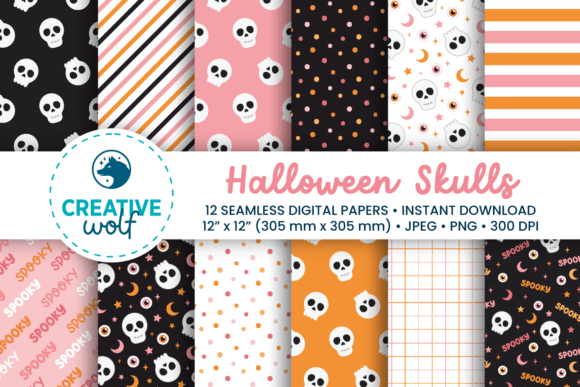
This isn’t a collection of isolated skull illustrations. It’s a functional toolkit. Each pattern is sized to 12 × 12 inches (3600 × 3600 pixels) at 300 dpi — the industry standard for professional printing — and delivered in two color modes: RGB PNGs for digital screens and CMYK JPEGs for accurate print reproduction. That dual-format approach eliminates guesswork when moving between screen-based marketing and tangible outputs like greeting cards, gift wrap, or packaging.
The 12 patterns include:
- Cute skull motifs — stylized, friendly, and scalable without visual noise
- Subtle eyeball, moon, and star doodle repeats — ideal for layered backgrounds or secondary textures
- A “spooky season” typographic pattern — legible at scale, with balanced negative space
- Classic foundations: stripes, polka dots, and gingham — all reimagined with soft pastel pink and orange tones instead of traditional black-orange contrast
The palette stands out without alienating. Pastel pink and muted orange provide seasonal recognition while remaining accessible to broader audiences — think educators preparing classroom decorations, indie stationery brands targeting Gen Z buyers, or wellness-focused businesses launching limited-edition Halloween merch. It avoids cliché without sacrificing thematic clarity.
Seamless Tiling Done Right
“Seamless” is often claimed but rarely executed well. In the Skulls Halloween Digital Paper Pack, tiling works as advertised: no visible joins, no pixel misalignment, no softening or blurring at edges. This was verified across multiple test prints (letter, A4, and 12 × 12 scrapbook sheets) and digital mockups (social banners, email headers, product labels). The consistency means you can confidently scale a single pattern to cover an entire gift box, a large-format poster, or a website background — without generating artifacts or losing crispness.
That reliability saves time. There’s no need to manually blend edges, adjust repeat settings in design software, or patch gaps in Illustrator or Canva. For freelancers managing tight deadlines or small business owners handling their own design work, that predictability translates directly into fewer revisions and faster turnaround.
Real-World Use Cases — Beyond the Obvious
While scrapbooking and printable party décor are natural fits, the Skulls Halloween Digital Paper Pack supports more nuanced applications:
- Small business packaging: The gingham and striped patterns work exceptionally well as inner liner textures for mailer boxes or tissue paper overlays — adding tactile appeal even in unboxing videos.
- Digital marketing assets: The RGB PNGs integrate cleanly into Canva, Adobe Express, and Figma. The “spooky season” type pattern, for example, served well as a subtle background for Instagram Stories promoting a limited-time offer — legible, on-brand, and non-distracting.
- Educational materials: Teachers used the eyeball and moon patterns to create themed worksheets and reading trackers — the soft colors reduce visual fatigue compared to high-contrast alternatives.
- Phone and desktop wallpapers: Because each file is 3600 × 3600 pixels, cropping to common aspect ratios (e.g., 9:16 for mobile) retains ample resolution and compositional flexibility.
Bonus Assets: Washi Tape Designs That Extend Utility
The included 16 washi tape designs — provided in both PNG and TIFF formats with transparent backgrounds — aren’t filler. They’re practical extensions of the core patterns. Each tape strip mirrors one of the 12 papers (e.g., a skull-repeat tape, a gingham tape), plus variations in width and alignment. Used in digital mockups, they add authenticity to product presentations; printed on adhesive paper, they become functional craft elements. Their transparency allows layering over photos, text, or other patterns — a detail that matters for designers building multi-element compositions.
Who Benefits Most — And When It Might Fall Short
This pack suits professionals and serious hobbyists who value consistency, cross-platform compatibility, and intentional design. It’s especially useful for:
- Print-on-demand sellers creating themed notebooks, stickers, or apparel — the CMYK JPEGs ensure predictable output across third-party printers.
- Content creators producing seasonal social media kits — the cohesive palette simplifies brand alignment across posts, stories, and Reels thumbnails.
- Educators and librarians developing inclusive, age-appropriate Halloween resources — the cute (not scary) aesthetic broadens usability across grade levels and sensitivities.
- Freelance designers building client-facing mood boards or pitch decks — the files load quickly, scale reliably, and avoid licensing ambiguity (personal + commercial use is explicitly permitted).
Limitations are minimal but worth noting. The pack does not include SVG or vector files — so if you need infinitely scalable versions for laser cutting or embroidery digitizing, you’ll need to trace or convert manually. It also doesn’t contain editable source files (e.g., PSD layers or AI vectors), meaning customization beyond color adjustment or cropping requires external tools. And while the pastel palette is versatile, it may not suit clients or markets expecting bold, gothic, or vintage-inspired Halloween visuals.
Practical Recommendations for Getting Started
Start by testing one pattern in your most common workflow. If you print frequently, open a JPEG in your preferred layout software and tile it across an A4 sheet — check for edge continuity and color fidelity on your actual printer. If you work digitally, drop a PNG into a social media template and zoom to 200% — confirm no dithering or compression artifacts appear.
For long-term value, organize the files by use case: keep CMYK JPEGs in a “Print” folder, RGB PNGs in “Digital,” and washi tapes in “Overlays.” Name them descriptively (e.g., “skulls-pink-gingham-cmyk.jpg”) rather than relying on default numbering — it speeds up selection during time-sensitive projects.
The Skulls Halloween Digital Paper Pack earns its place not through novelty, but through execution: clean files, intelligent color choices, and format options that respect real production constraints. It’s a resource that stays useful beyond the holiday — because good design fundamentals, not just seasonal trends, are what make creative work sustainable.