Skull Digital Papers: 10 Seamless Halloween Backgrounds for Real Creative Work
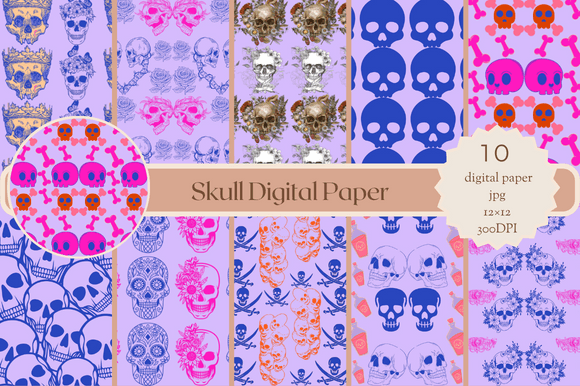
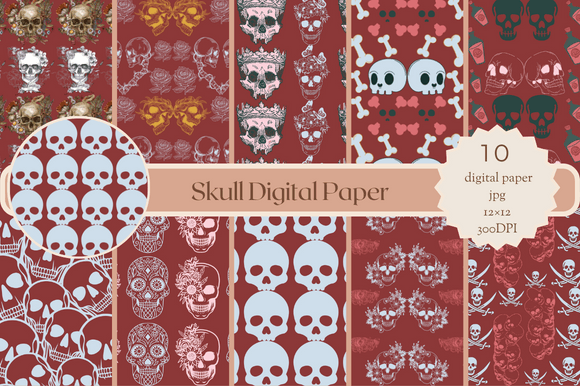
If you’ve ever spent an hour resizing, tiling, or color-correcting a background only to realize it doesn’t scale cleanly—or worse, leaves visible seams on your printed invitation—you know how much time high-quality digital papers save. Skull Digital Papers isn’t just another Halloween-themed download. It’s a practical toolkit: 10 seamless, high-resolution patterns designed to drop straight into real projects without fuss.
Each background is 12×12 inches at 3600×3600 pixels, rendered at 300 DPI—meaning they hold up flawlessly whether you’re printing a large-format scrapbook page, designing a boutique party invitation, or layering texture into a digital social media graphic. No stretching. No pixelation. No guesswork.
Where These Patterns Actually Get Used (Not Just Saved)
Take Maya, a freelance greeting card designer in Portland. She’s building a limited-edition Halloween collection for Etsy—and needs backgrounds that feel cohesive but never repetitive. With Skull Digital Papers, she drops one pattern into her Canva template for a “spooky tea party” invite, swaps to another for the matching thank-you card, and uses a third as a subtle overlay on a product mockup. Because all 10 are seamless and same-sized, she maintains consistency across formats without reformatting anything.
Then there’s Derek, who runs a small after-school art program in Ohio. He prints 20+ copies of a Halloween craft worksheet every October. Last year, he used a free online background that looked fine on screen—but when printed, the repeat was obvious, and the black tones came out muddy. This year? He imports one of the Skull Digital Papers into his PDF editor, sets it as a watermark-layer behind student instructions, and gets crisp, rich results every time—even on his school’s mid-tier laser printer.
More Than Just “Halloween Decor”
Yes, these are Halloween-themed. But their usefulness stretches far beyond October 31st. The patterns include subtle bats, tonal cobwebs, minimalist skulls, vintage-inspired crossbones, and moody damasks—all designed with versatility in mind. A muted charcoal-and-cream skull motif works just as well for a gothic wedding invitation as it does for a book cover design or a boutique candle label. A delicate black-and-white web pattern adds quiet texture to a mindfulness journal page or a teacher’s classroom handout.
Small business owners use them to refresh seasonal email headers without hiring a designer each time. Bloggers layer them under text blocks to add visual interest to Pinterest pins or blog banners—no need to worry about readability, since the contrast and density are balanced for legibility. Educators embed them into Google Slides for themed lesson intros (think: a chemistry unit on “chemical reactions” with a subtle potion-bottle pattern), making content feel intentional—not clip-art casual.
Real Workflow Benefits You’ll Notice Immediately
- No tile anxiety. Seamless means no visible edges when repeated—critical if you’re designing a full-page background for a printable planner or wrapping paper.
- Consistent sizing saves setup time. All 10 files are 12×12 inches at 300 DPI, so whether you’re working in Photoshop, Affinity Designer, Cricut Design Space, or even Microsoft Word, you’re not juggling mismatched dimensions.
- JPG format = universal compatibility. No need to convert, unzip layers, or troubleshoot PSD files. Open, place, and go—even on older machines or tablets.
- High resolution supports both digital and physical output. Use the same file for an Instagram Story background and a 12×12 scrapbook layout—without swapping assets or adjusting quality settings.
Who Gets the Most Out of Skull Digital Papers?
Scrapbookers appreciate how easily these integrate into hybrid layouts—printed photos sit cleanly over textured backgrounds, and cutting machines read the contrast reliably. Invitation designers rely on the clean repeats for elegant edge-to-edge printing, especially when ordering through services like Minted or local print shops that require precise bleed and resolution specs.
Teachers and homeschoolers use them to create themed worksheets, behavior charts, or classroom signage that feels polished—not pieced together from five different free downloads. Content creators repurpose them as subtle overlays on YouTube thumbnails, podcast cover art, or Notion dashboard headers—adding personality without distracting from the core message.
Even non-designers benefit: someone planning a home Halloween party can import a pattern into a free tool like Photopea or Google Docs, add text for a “Trunk-or-Treat Sign-Up Sheet,” and print 50 copies that look professionally designed—not DIY-basic.
What to Consider Before You Use Them
These aren’t editable vector files—so if you need to recolor individual elements (like turning a black bat red), you’ll need basic photo editing skills. But for most users, that’s not a limitation—it’s a feature. The patterns are intentionally finished, balanced, and ready to use as-is.
Also worth noting: while they’re Halloween-themed, they lean toward sophisticated rather than cartoonish. If you’re creating for very young children or want bright neon colors and smiling pumpkins, this pack may not match that tone. But if you value mood, texture, and timeless execution over trend-chasing, Skull Digital Papers delivers exactly that.
How to Make Them Work Harder for You
Try these low-effort, high-impact techniques:
- Reduce opacity to 10–20%. Use as a subtle texture layer behind solid-color text boxes—adds depth without competing for attention.
- Print at 50% scale on kraft paper. Creates an instant vintage backdrop for handmade gift tags or favor bags.
- Import into Cricut Design Space as a Print Then Cut background. Lets you cut custom shapes (like tombstones or cauldrons) directly out of the patterned sheet—no alignment headaches.
- Use one as a consistent brand accent. Apply the same skull-damask pattern across your Etsy shop banner, newsletter header, and printable FAQ page for visual continuity.
At the end of the day, Skull Digital Papers solves a quiet but constant problem: the gap between inspiration and execution. You don’t need to be a pro designer to make something feel considered, cohesive, or commercially viable. You just need resources that respect your time, your tools, and your actual workflow—not just what looks good in a preview thumbnail.
Whether you’re prepping for a client deadline, prepping for a classroom holiday party, or quietly building your creative side hustle—one thoughtful, seamless, high-res background at a time—these 10 patterns earn their place in your digital toolkit.